advertisement
Robotic Arm: Message Controller Software
A robotic arm manipulator consists of joints and servomotors. It is attached to a fixed base and, upon receiving commands, executes movement actions. Moving is a two-step process: first, the arm needs to receive a command, and second, it must translate this command into coordinated actions that move the joints accordingly. This article focuses on the first question: How to send commands to the arm effectively?
In the last article, I put together a 4 degrees of freedom robotic arm kit for Raspberry Pi. The kit provides a Raspberry Pi motor HAT that exposes UART, I2C, analog inputs and enough pins to control 3 stepper motors and 15 servo motors. The kit offers a complete control set in the official repository, but I wanted to create my own software to control the arm.
This article presents a step-by-step implementation of a client-server connection protocol based on Python and TCP sockets. In particular, multiple clients can connect to the server, send messages as a header and a payload data packet, and leave the connection open as long as necessary. The server will be responsible for receiving connections and messages from the client, parsing the bytes into Python objects and processing them as a move action.
This article originally appeared on my blog admantium.com.
Investigating the arm kit
The official repository contains the configuration, example code and programs to remotely control the arm. It provides two interfaces to the end user: a GUI application written in TK that runs on the Raspberry PI itself or on any computer that can establish a socket connection to the Pi. Or a web server that boots on the Pi and that any client with the correct IP address and port can connect to. By examining the source code files, we can learn this:
- The mechanism for transporting motion messages is a TCP socket.
- TCP socket is created on Raspberry Pi with a fixed port
- TK GUI client and web server accept user interactions and send commands to TCP socket server.
- The server accepts the message, determines the specific content of the message, and tells the arm to move.
- Messages are simple commands like
X_minus
,X_add
, or composite positions of all axes leading to continuous motion
Design Considerations for the Remote Control
With this knowledge, and previous experience designing the control software for my RADU moving robot, we can formulate the following requirements:
- The arm needs to be accessed through a network interface.
- This interface can be written in Python and directly manipulate the arm.
- Move commands must be simple text commands.
- Commands must be executed immediately.
- When integrating ROS, a message gateway class can be added to transform ROS messages to custom format.
Therefore, messages must be sent to the Pi. Effectively, this is serial data over the network, providing code decoupling and providing the means to implement different transport mechanisms. I liked the simplicity of the TCP sockets used in the official example. And then I choose to replicate the same mechanism.
Deploying the server
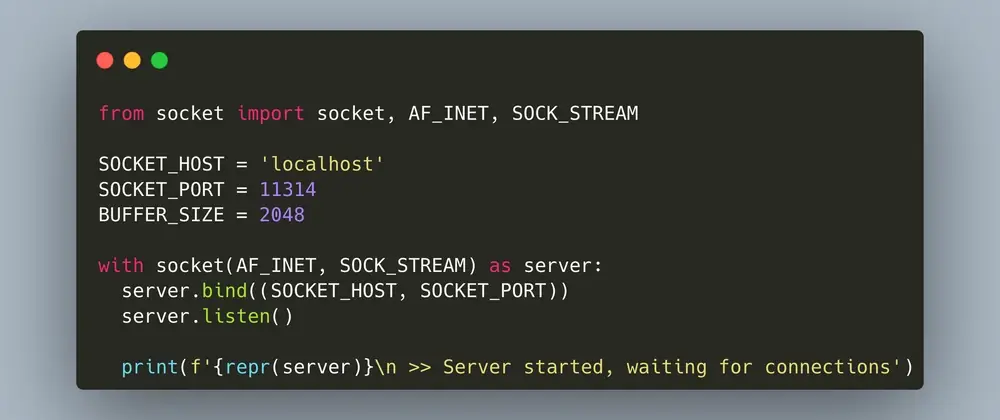
To open a TCP socket, Pythons built-in socket
Se utiliza la biblioteca. This library is versatile and allows you to create various types of sockets. The particular socket type of our choice is AF_INET
, which means TCP with IPv4, and the SOCK_STREAM subtype
, a continuous and bidirectional data flow. We also define default values such as IP address and port.
The first iteration of the server code will open a socket object, bind to the specified IP and port, and then listen for any incoming traffic. In a continuous loop, the server waits for any connection received. If a client connects, it will print a message to the terminal, then decode and print the message the client sends.
from socket import socket, AF_INET, SOCK_STREA
advertisement
Related Articles

advertisement